Microsoft has added AI enhancements to its low-code website building offering, Power Pages.
Announced at its Microsoft Build conference, Copilot in Power Pages lets website developers leverage AI capabilities for copywriting and form building.
The new update to Microsoft Power Pages tool looks to speed up the time it takes website builders to generate text, build detailed forms and chatbots, using intelligent suggestions.
AI site building
Available in public preview now, albeit in North America only, Copilot in Power Pages aims to cut down website development time with features such as auto-generated tables in Microsoft Dataverse to create corresponding forms.
Also available in public preview, the update also includes a virtual table and Power Automate integration in Power Pages that enables cloud flow from web page events.
Developers will be able to leverage these AI-enabled enhancements in Power Pages to jump-start their journey of ideation and building of impactful, secure external website-based services to better respond and serve their customers.
First revealed at Build 2022, Power Pages also includes the integration of Copilot chatbot activation that includes generative answers within the setup workspace.
“You also have the flexibility to adjust, add, or fine-tune fields using natural language input. It’s a more streamlined approach to form creation,” Sangya Singh, Vice President of Power Pages, noted in a blog post.
“For your website visitors, this feature enhances their interaction with your site, allowing them to ask natural language questions and receive concise responses complete with relevant links to optimize both administrative functionality and website engagement experiences.”
Microsoft is working on adding other AI capabilities including page creation, site theming, and image generation, which is predicted to be available in summer 2023.
The rise of AI tools like ChatGPT and Google Bard has presented the perfect opportunity to make significant leaps in multilingual speech projects, advancing language technology and promoting worldwide linguistic diversity.
Meta has taken up the challenge, unveiling its latest AI language model - which is able to recognize and generate speech in over 4,000 spoken languages.
The Massively Multilingual Speech (MMS) project means that Meta’s new AI is no mere ChatGPT replica. The model uses unconventional data sources to overcome speech barriers and allow individuals to communicate in their native languages without going through an exhaustive translation process.
Most excitingly, Meta has made MMS open-source, inviting researchers to learn from and expand upon the foundation it provides. This move suggests the company is deeply invested in dominating the AI language translation space, but also encourages collaboration in the field.
Bringing more languages into the conversation
Normally, speech recognition and text-to-speech AI programs need extensive training on a large number of audio datasets, combined with meticulous transcription labels. Many endangered languages found outside industrialised nations lack huge datasets like this, which puts these languages at risk of vanishing or being excluded from translation tools.
According to Gizmochina, Meta took an interesting approach to this issue and dipped into religious texts. These texts provide diverse linguistic renditions that allow Meta to get a ‘raw’ and untapped look at lesser-known languages for text-based research.
The release of MMS as an open-source resource and research project demonstrates that Meta is devoting a lot of time and effort towards the lack of linguistic diversity in the tech field, which is frequently limited to the most widely-spoken languages.
It’s an exciting development in the AI world - and one that could bring us a lot closer to having the sort of ‘universal translators’ that currently only exist in science fiction. Imagine an earpiece that, through the power of AI, could not only translate foreign speech for you in real time but also filter out the original language so you only hear your native tongue being spoken.
As more researchers work with Meta’s MMS and more languages are included, we could see a world where assistive technology and text-to-speech could allow us to speak to people regardless of their native language, sharing information so much quicker. I’m super excited for the development as someone trying to teach themselves a language as it’ll make real-life conversational practice a lot easier, and help ghetto grips with informal and colloquial words and phrases only native speakers would know.
Apple has only just dropped iOS 16.5, but already there’s a public beta for iOS 16.6, the finished version of which will probably land in the next month or so, based on past form. This doesn’t look to be one of the biggest iOS updates ever, but there’s one potentially very useful new feature.
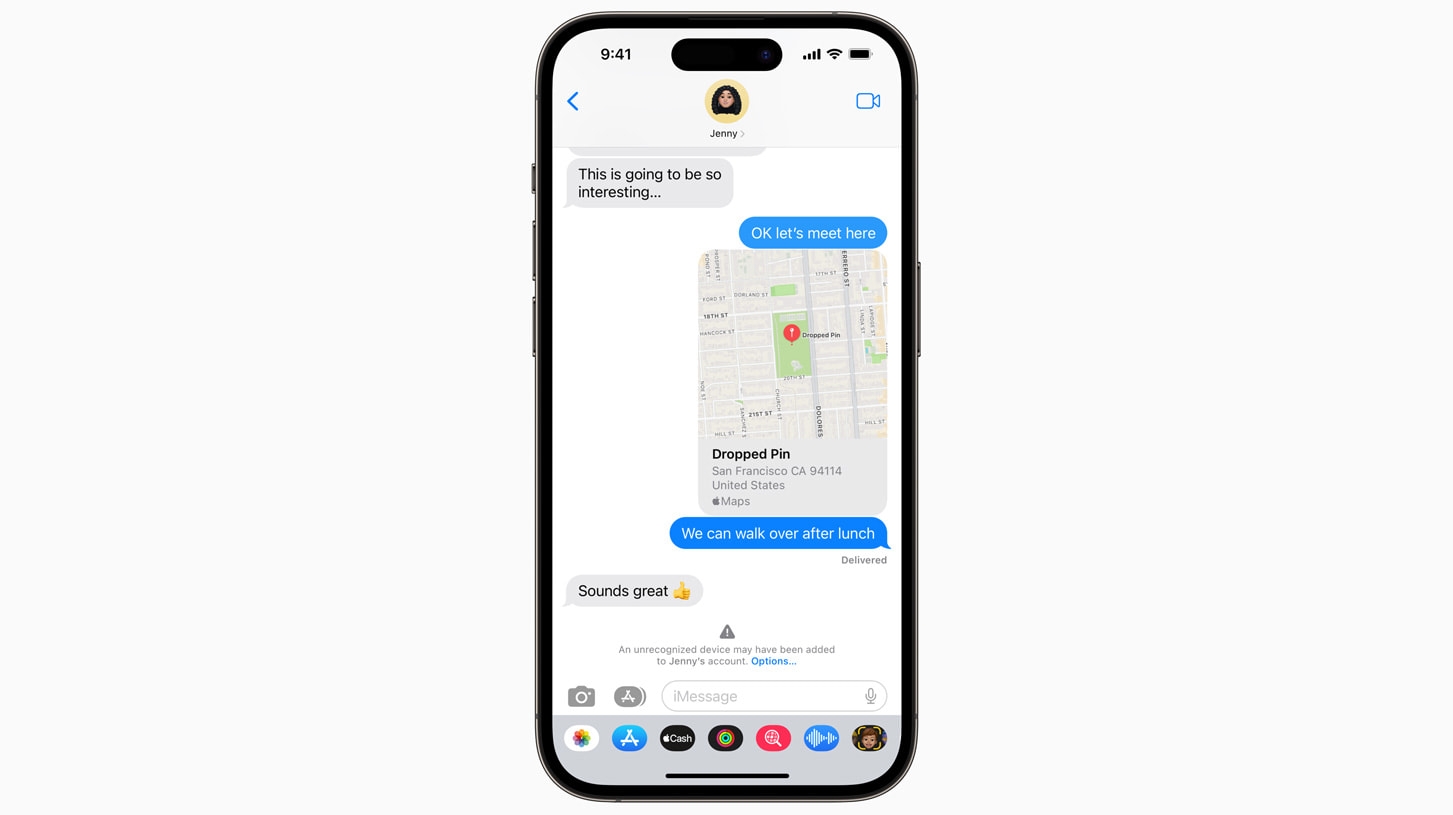
That feature is iMessage Contact Key Verification, which Apple actually announced last year, but is only now activating. If you and the person or people you’re messaging both enable this feature, then you’ll be alerted if Apple detects a potential intrusion – for example, if the cloud servers your messages are carried on appear to have been breached.
Contact Verification Codes can also be compared and verified in person or over a FaceTime call. So, all this is essentially a way of verifying that you’re talking to the person you believe you’re talking to, and that no one is eavesdropping on the conversation.
(Image credit: Apple)
This is probably a level of security beyond what most people really need, especially as iMessage is already end-to-end encrypted. Indeed, when Apple announced the feature, it positioned this as something aimed at people facing "extraordinary digital threats," such as journalists and government officials.
It’s a feature that’s designed to stop “an exceptionally advanced adversary, such as a state-sponsored attacker,” so this isn’t something you should – in theory – need to avoid garden-variety hackers. That said, it’s something anyone can enable, so if you want that extra peace of mind, the option is now there.
Or it will be, anyway – while the feature is now visible, it doesn’t appear to be functional yet, according to BGR.
Few features to find
Presumably, then, Apple is still getting it set up, but with it visible in this iOS 16.6 beta, it seems very likely that the iMessage Contact Key Verification feature will fully launch in the finished version of iOS 16.6.
This seems to be the only feature that has been found in this iOS 16.6 beta, and handily Apple hasn’t provided any release notes for the beta. So, there may be more features lurking in there, and there may be additional features added in subsequent betas or the finished iOS 16.6 release.
But as we’re not aware of any functional changes in this current build, there’s probably no need to download it. And while it will definitely be worth grabbing the finished version, we might not see many new features until iOS 17.
WhatsApp is saving you from those awkward spelling mistakes and missing commas by giving you the power to edit messages - within limits.
We first saw inklings of this update in a late March beta. The feature didn’t work at the time, but there were some clues hinting at how it would function. From the looks of things, not much has changed since then.
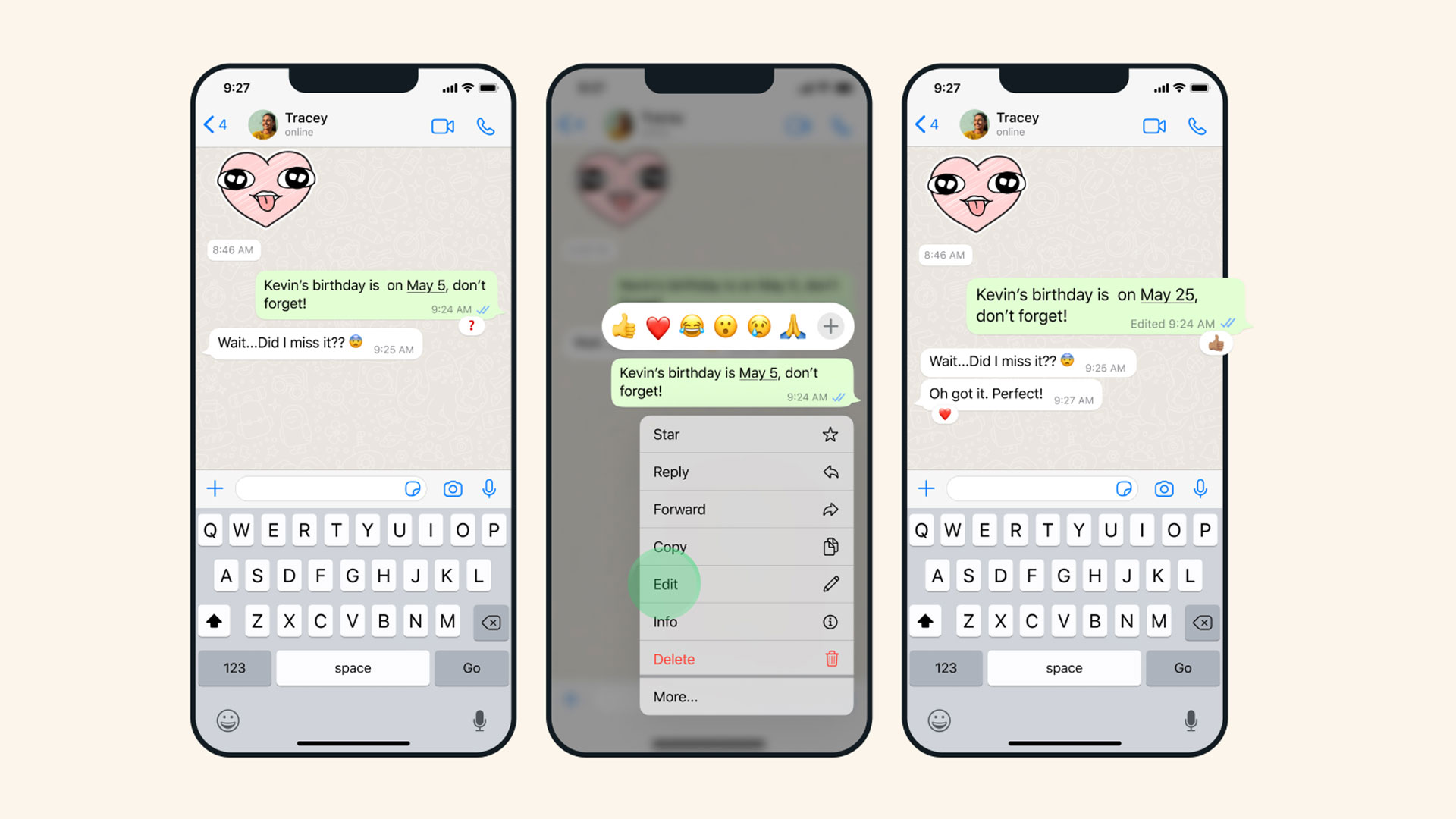
To fix a text, Meta states you need to first long-press a sent message and then select Edit from the menu that appears. Users have 15 minutes to make their corrections. Texts cannot be changed past the time limit, forcing you to live with the typos you made (or you can just send a new text).
Messages that have been altered will display ‘Edited’ right next to them, making it clear to others in a chat that some corrections have been made. It all works similarly to iMessage editing on iOS 16. WhatsApp, however, will not save any sort of edit history, meaning others won’t be able to see previous versions of texts.
Editable messages are currently “rolling out to users globally and will be available to everyone in the coming weeks” so keep an eye out for the new patch. We asked Meta if there are any other restrictions. For example, on iOS 16 users can only make up to five edits to a text within a 15-minute window. This story will be updated at a later time.
WhatsApp Message Editing(Image credit: WhatsApp)
A very busy month
WhatsApp has had quite a busy month as the platform has seen multiple updates in a short amount of time. Just last week, the app gained a Chat Lock tool, ensuring your private conversation stays private which can be useful if you’re using a shared phone. Before that, we saw the introduction of single-vote polls “to stop people from skewing [results] with multiple votes.”
As for the near future, it appears Meta will soon launch a “password reminder feature for end-to-end encrypted backups”, according to a recent post from WABetaInfo. The app will ask you to verify the password so you’ll always have access to the backup in the event you forget your login credentials. This particular update will be rolling out to both Android and iOS “over the coming weeks.”
Photoshop has been steadily adding AI-powered tools to its menus in recent years, but an incredible new demo from an independent research team shows where the best photo editors are heading next.
DragGAN may not be a fully-fledged consumer product yet, but the research paper (picked up on Twitter by AI researchers @_akhaliq and @icreatelife) shows the kinds of reality-warping photo manipulation that's going to be possible very soon. This AI-powered tech will again challenge our definition of what a photo actually is.
While we've seen similar photo editing effects before – most notably in Photoshop tools like Perspective Warp – the DragGAN demo takes the idea and user interface to a new level. As the examples below show, DragGAN lets you precisely manipulate photos to change their subject's expressions, body positions and even minor details like reflections.
The results aren't always perfect, but they are impressive – and that's because DragGAN (whose name is a combination of 'drag' and 'generative adversarial network') actually generates new pixels based on the surrounding context and where you place the 'drag' points.
Photoshop's neural filters, particularly those available in the app's beta version, have dabbled in similar effects for a while, for example giving you sliders for 'happy' and 'anger' expressions for tweaking portrait images. DxO software like Photolab also has U Point technology that lets you point at the part of a photo that you'd like to make local adjustments on.
But the power of the DragGAN demo is that it combines both concepts in a pretty user-friendly way, letting you pick the part of a photo you want to change and then completely changing your subject's pose, expression and more with very realistic results.
When a refined version of this technology ultimately lands on smartphones, imperfect photos will be a thing of the past – as will the idea of a photo being a record of a real moment captured in time.
DragGAN also offers more granular controls, too. If you don't want to change the entire photo, you can apply a mask to a particular area – for example, your dog's head – and the algorithm will only affect that selected area. That level of control should also help reduce artifacts and errors.
The research team has also promised that in the near future it plans "to extend point-based editing to 3D generative models.” Until then, expect to see this kind of reality-warping photo editing improve at a rapid pace in some of the best Photoshop alternatives soon.
Analysis: The next Photoshop-style revolution
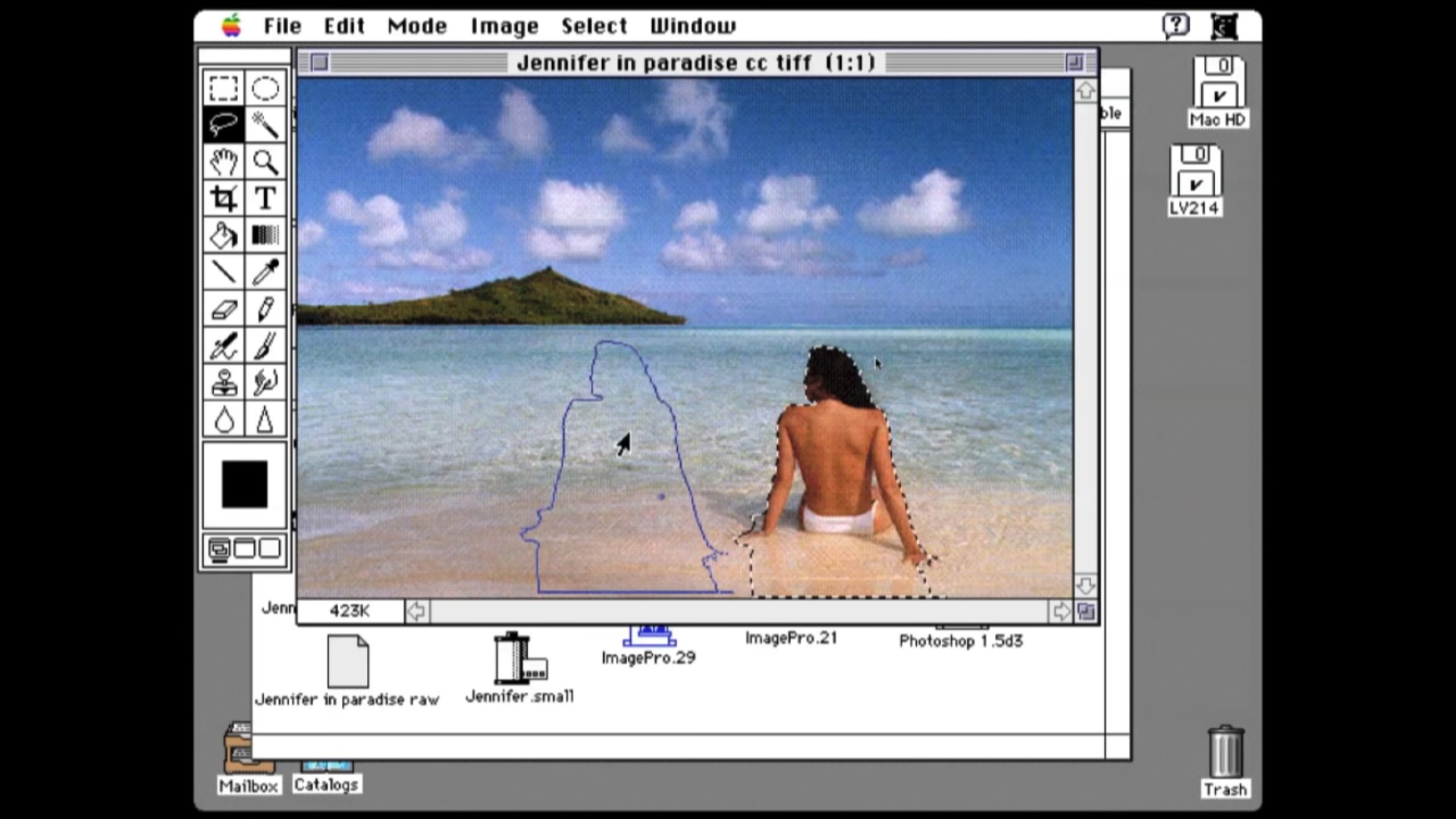
An early demo of the first version of Photoshop, showing the iconic 'Jennifer in Paradise' photo being edited.(Image credit: Adobe)
These AI-powered photo editing tricks have echoes of the first early demos of Photoshop over 35 years ago – and will likely have the same level of impact, both culturally and on the democratization of photo editing.
In 1987, the co-creator of Adobe Photoshop John Knoll took the photo above – one of the most significant of the last century – on a Tahiti beach and used it to demo the incredible tools that would appear in the world's most famous photo editing app.
Now we're seeing some similarly momentous demos of image-manipulating tools, from Google's Magic Eraser and Face Unblur to Photoshop's new Remove Tool, which lets you remove unwanted objects in your snaps.
But this DragGAN demo, while only at the research paper phase, does take the whole concept of 'photo retouching' up a notch. It's reforming, rather than retouching, the contents of our photos, using the original expression or pose simply as a starting point for something completely different.
Photographers may argue that this is more digital art than 'drawing with light' (the phrase that gives photography its name). But just like the original Photoshop, these AI-powered tools will change photography as we know it – whether we want to embrace them or not.
Windows 10 users are suffering at the hands of some fresh bugs introduced by the latest update for the OS from Microsoft.
That would be KB5026361, the cumulative update for Windows 10 for May, which was released a couple of weeks back, and appears to be causing a bunch of glitches and more serious problems.
In the serious category we can file some Reddit users who are complaining on two counts of the patch ‘bricking’ their PC, and also reports of Blue Screen of Death (BSoD) crashes post-update.
Some of those BSoDs offer up an error that reads ‘Process1 Initialization Failed’ and as Neowin, which spotted this, explains, this seemingly occurs due to the Bootcat.cache file becoming corrupted (or its size having changed since the last time the PC booted).
Other Windows 10 users are encountering a problem that’ll sound familiar, no doubt – the failure to install the update, often accompanied with a meaningless error code (such as ‘0x800f0922’ which appears to be one of the more prevalent occurrences in this case).
On top of that, there are scattered complaints such as someone’s Windows 10 mouse settings being reset after the update (and some previous updates too, we’re told).
Others have lodged complaints about bugs with KB5026361 in Microsoft’s Feedback Hub, and another report from a Redditor states that their laptop’s Wi-Fi doesn’t work, and that the ‘windows bar is locked’ (presumably the taskbar is unresponsive) after the update.
Analysis: Another update and yet more problems
Given that there are only two reports of bricked PCs, we can’t jump to conclusions – there could possibly be other issues at play in those instances. Still, it’s worrying to see such reports, even if this clearly isn’t a widespread problem. BSoD crashes are a nasty thing to be happening here, too.
It’s not surprising to see installation failures with the cumulative update for May, as this bugbear is one Microsoft just can’t seem to shake, in Windows 11 as well as Windows 10.
As for the ‘Process1 Initialization Failed’ problem, Neowin does point out that Microsoft has a cure for that particular error – though the catch is that it’s for Windows 7 officially (via an old support document).
The method suggests booting with a Windows installation USB drive, then deleting the problematic Bootcat.cache file, before restarting the PC. We’re not sure that’s a good idea, though – and certainly not something for those less confident with PCs to try – but more tech-savvy types could always attempt it as a last resort if desperate.
Hopefully, Microsoft will be looking into these issues, and fixes will be implemented as needed. Although these days, we get the sense that Microsoft is focusing far more on Windows 11 than Windows 10, what with the latter getting no more features from now on (save for, perhaps, the odd very minor tweak).
Still, on the brighter side, no more features should mean fewer bugs being introduced – in theory, anyway.
The Apple VR headset is getting close to its rumored arrival at WWDC 2023 on June 5 – and the mixed-reality wearable is expected be launched alongside an exciting new operating system, likely called xrOS.
What is xrOS? We may now be approaching iOS 17, iPadOS 16 and macOS 13 Ventura on Apple's other tech, but the Apple VR headset – rumored to be called the Apple Reality One – is expected to debut the first version of a new operating system that'll likely get regular updates just like its equivalents on iPhone, iPad and Mac.
The latest leaks suggest that Apple has settled on the xrOS name for its AR/VR headset, but a lot of questions remain. For example, what new things might xrOS allow developers (and us) to do in mixed reality compared to the likes of iOS? And will xrOS run ports of existing Apple apps like Freeform?
Here's everything we know so far about xrOS and the kinds of things it could allow Apple's mixed-reality headset to do in both augmented and virtual reality.
xrOS release date
It looks likely that Apple will launch its new xrOS operating system, alongside its new AR/VR headset, at WWDC 2023 on June 5. If you're looking to tune in, the event's keynote is scheduled to kick off at 10am PT / 1pm ET / 6pm BST (or 3am ACT on June 6).
This doesn't necessarily mean that a final version of xrOS will be released on that day. A likely scenario is that Apple will launch an xrOS developer kit to allow software makers to develop apps and experiences for the new headset.
Yooo Apple just trademarked xrOS in their SF Pro font! It’s happening guys! Via @ParkerOrtolani pic.twitter.com/wdx4Q3RbQEMay 16, 2023
See more
While not a typical Apple approach, this is something it has done previously for the Apple TV and other products. A full version of xrOS 1.0 could then follow when the headset hits shelves in late 2023.
The software's name now at least looks set in stone. As spotted by Parker Ortolani on Twitter on May 16, Apple trademarked the 'xrOS' name in its traditional 'SF Pro' typeface in New Zealand, via a shell company.
We'd previously seen reports from Bloomberg that 'xrOS' would be the name for Apple's mixed-reality operating system, but the timing of this discovery (and the font used) bolster the rumors that it'll be revealed at WWDC 2023.
(Image credit: Future)
A report from Apple leaker Mark Gurman on December 1, 2022, suggested that Apple had "recently changed the name of the operating system to “xrOS” from “realityOS," and that the name stands for "extended reality". This term covers both augmented reality (which overlays information on the real world) and virtual reality, a more sealed experience that we're familiar with on the likes of the Meta Quest 2.
While xrOS is expected to have an iOS-like familiarity – with apps, widgets and a homescreen – the fact that the Apple AR/VR headset will apparently run both AR and VR experiences, and also use gesture inputs, explains why a new operating system has been created and will likely be previewed for developers at WWDC.
What is xrOS?
Apple's xrOS platform could take advantage of the AR/VR headset's unique hardware, which includes an array of chips, cameras and sensors. It's different from ARKit, the software that lets your iPhone or iPad run AR apps. Apple's xrOS is also expected to lean heavily on the design language seen on the iPhone, in order to help fans feel at home.
According to Bloomberg's Gurman, xrOS "will have many of the same features as an iPhone and iPad but in a 3D environment". This means we can expect an iOS-like interface, complete with re-arrangeable apps, customizable widgets and a homescreen. Apple is apparently also creating an App Store for the headset.
Stock apps on the AR/VR headset will apparently include Apple's Safari, Photos, Mail, Messages and Calendar apps, plus Apple TV Plus, Apple Music and Podcasts. App developers will also be able to take advantage of its health-tracking potential.
Gurman says that the headset experience will feel familiar to Apple fans – when you put it on, he claims that "the main interface will be nearly identical to that of the iPhone and iPad, featuring a home screen with a grid of icons that can be reorganized".
But how will you type when wearing the Apple Reality Pro (as it's rumored to be called)? After all, there probably won't be any controllers.
The Sightful Spacetop (above) gives us a glimpse of how the Apple AR/VR headset could work us a virtual Mac display.(Image credit: Sightful)
Instead, you'll apparently be able to type using a keyboard on an iPhone, Mac or iPad. There's also the slightly less appealing prospect of using the Siri voice assistant. Apple is rumored to be creating a system that lets you type in mid-air, but Gurman claims that this feature "is unlikely to be ready for the initial launch".
It's possible that you'll be able to connect the headset to a Mac, with the headset serving as the Mac's display. We've recently seen a glimpse of how this might work with the Spacetop (above), a laptop that connects to some NReal AR glasses to give you a massive 100-inch virtual display.
What apps will run on xrOS?
We've already mentioned that Apple's AR/VR headset will likely run some optimized versions of existing stock apps, including Safari, Photos, Mail, Messages, Contacts, Reminders, Maps and Calendar.
But given that those apps aren't exactly crying out for a reinvention in AR or VR, they're likely to be sideshows to some of the more exciting offerings from both Apple and third-party developers.
So what might those be? Here are some of the most interesting possibilities, based on the latest rumors and what we've seen on the likes of the Meta Quest Pro.
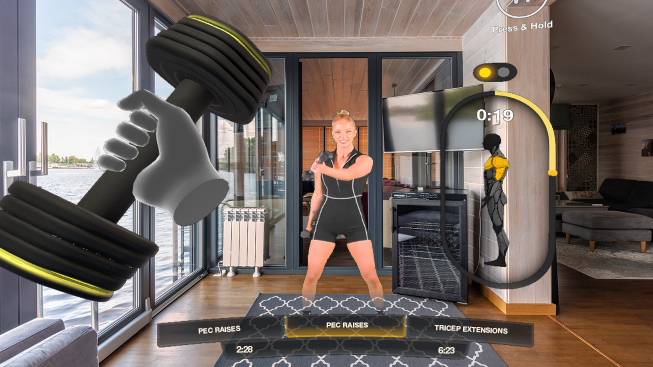
1. Apple Fitness Plus
Apps like Litesport (above) give us a glimpse of AR fitness experiences that could arrive of Apple's headset.(Image credit: Litesport)
Assuming the Apple AR/VR headset is light and practical enough for workouts – which is something we can't say for the Apple AirPods Max headphones – then it definitely has some AR fitness potential.
According to a report from Bloomberg's Mark Gurman on April 18, Apple is planning to tap that potential with "a version of its Fitness+ service for the headset, which will let users exercise while watching an instructor in VR".
Of course, VR fitness experiences are nothing new, and we've certainly enjoyed some of the best Oculus Quest fitness games. An added AR component could make them even more powerful and motivating, with targets added to your real-world view.
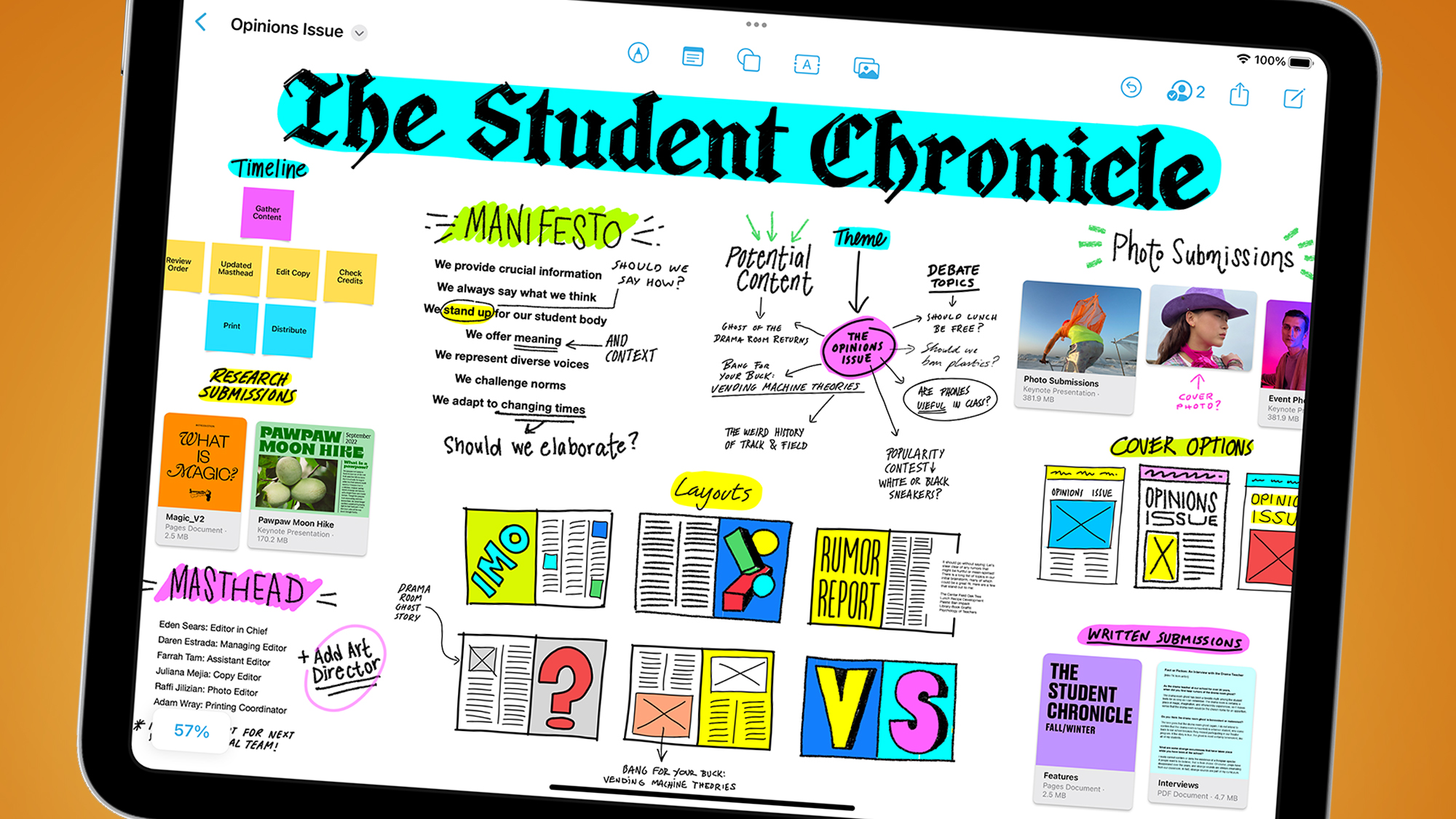
2. Apple Freeform
(Image credit: Apple)
We called Apple's Freeform, which gives you a blank canvas to brainstorm ideas with others, "one of its best software releases in years". And it could be taken to the next level with a version of AR or VR.
Sure enough, Bloomberg's aforementioned report claims that "Apple is developing a version of its Freeform collaboration app for the headset", which it apparently "sees as a major selling point for the product".
Okay, work-themed AR/VR work experiences might not sound thrilling and we certainly had misgivings after working for a whole week in VR with the Meta Quest Pro. But mixed-reality whiteboards also sound potentially fun, particularly if we get to play around with them in work time.
3. Apple TV Plus
(Image credit: NextVR)
Because Apple's headset will have a VR flipside to its AR mode, it has huge potential for letting us watch TV and video on giant virtual screens, or in entirely new ways. This means that Apple TV Plus will also likely be pre-installed in xrOS.
Another claim from that Bloomberg report on April 18 was that "one selling point for the headset will be viewing sports in an immersive way". This makes sense, given Apple already has deals for Major League Baseball and Major League Soccer on Apple TV Plus.
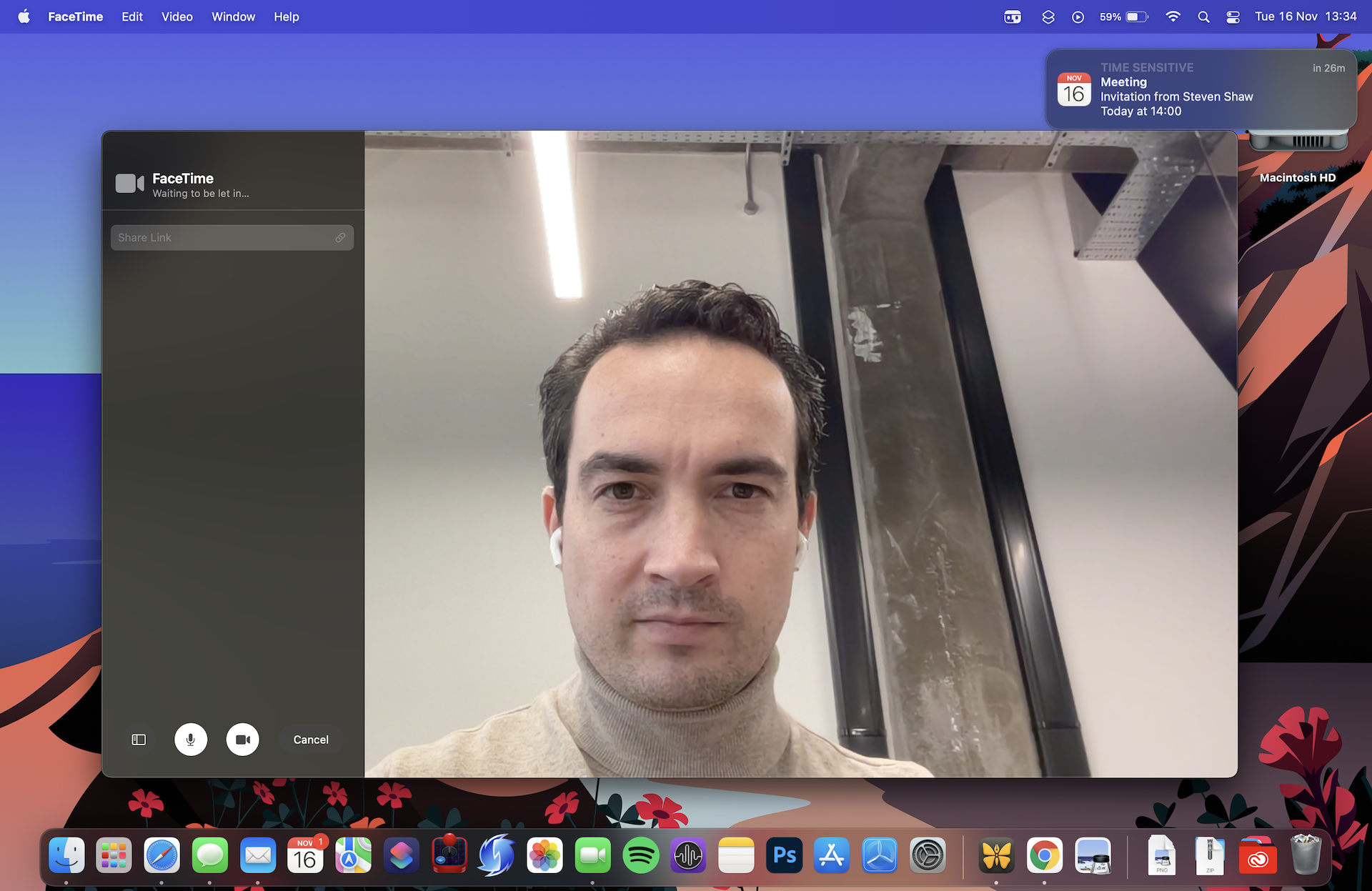
While we haven't been blown away by our experiences with VR meetings in Horizon Workrooms on the Meta Quest, the Apple mixed-reality headset will apparently deliver a next-gen version of FaceTime – and the Reality Pro's hardware could take the whole experience up a notch,
With an earlier report from The Information suggesting that Apple's headset will have at least 12 cameras (possibly 14) to track your eyes, face, hands and body, it should do a decent job of creating a 3D version of you in virtual meeting rooms.
We still haven't really seen a major real-world benefit to VR video meets, even if you can do them from a virtual beach. But we're looking forward to trying it out, while crossing our virtual fingers that it works more consistently than today's non-VR FaceTime.
5. Adobe Substance 3D Modeler
Adobe has already released some compelling demos, plus some beta software called Substance 3D Modeler (above), showing the potential of its creative apps in VR headsets. Will that software's list of compatible headsets soon include the Apple Reality Pro? It certainly seems possible.
The software effectively lets you design 3D objects using virtual clay in a VR playground. Quite how this would work with Apple's headset on xrOS isn't clear, given it's rumored to lack any kind of physical controllers.
These kinds of design tools feel like a shoo-in for Apple's headset, given many of its users are already happy to shell out thousands on high-end Macs and MacBooks to use that kind of software in a 2D environment.
Windows 11 has just introduced Phone Link support for iOS, which has now rolled out to everyone – but we’re hearing a warning that iPhone owners could be spied upon by somebody leveraging a flaw allowing for misuse of the app.
Phone Link has been around for Android for ages, and allows messages, notifications, and much more to be piped through to a Windows 11 PC, so you can deal with them there on the desktop without even picking up your smartphone.
So, its introduction to iOS is a definite boon for iPhone users – even if it’s a more limited set of features than Android – but the problem is that cyber-stalkers could abuse the functionality due to the way Phone Link has been implemented for Apple handsets.
Certo Software, a mobile security outfit, reports that several of its users have said they’ve been spied upon using Phone Link for iOS.
How does this work? Certo explains (via Apple Insider) the process in a news post, though the key thing to note is that to compromise an individual, the cyber-stalker needs physical access to the victim’s iPhone.
If the attacker can get that – and knows the passcode for the device – it’s an easy enough matter to set up Phone Link on their own Windows PC. Certo doesn’t detail the exact steps, so as not to give would-be abusers that information, but observes that it involves scanning a QR code on the PC monitor with the victim’s iPhone in order to setup a Bluetooth connection.
Once that’s done and Phone Link is set up, then things like phone call history, iMessages, and the content of any notifications can be viewed on that PC, with the iPhone owner unaware that any of their data is being compromised in this manner.
Certo notes that “cyberstalkers seem to be rapidly exploiting this new feature” and that this is obviously worrying.
(Image credit: Thai Nguyen / Unsplash)
Analysis: What can be done?
This is particularly concerning as it could be leveraged in scenarios where, for example, an abusive partner might use this. They’d be able to view all messages and notifications, and engage in some quite in-depth spying on their victim, all without their partner’s knowledge.
If you own an iPhone and are now feeling concerned, Certo explains there are several actions you can take to check that you’re not being spied on in this way. Firstly, if you don’t ever use Bluetooth, check to make sure it’s turned off – without that wireless connection enabled, there can be no communication with the linked Windows PC.
Alternatively, you can look at what devices have been hooked up to your iPhone’s Bluetooth, and delete any you don’t recognize. To do that, head into Settings, and navigate to Bluetooth > My Devices. If you see any devices that you’re not sure about, or don’t know what they are, you can use ‘Forget This Device’ to remove them from your iPhone (thereby cutting the link).
Finally, it obviously helps if no one else knows your iPhone passcode to unlock it to gain access – if they do, or you think they might, then change it, and don’t share the passcode with anyone at all (after you’ve completed the above Bluetooth housekeeping).
Certo further warns: “As with previous loopholes in iPhone security, it may not be long before spyware makers start creating tools that make use of this method to extract even more information from victim’s iPhones.”
We don’t know how widely this method might’ve been exploited thus far, as the suggestion seems to be it’s just a scattering of reports, with the potential for things to get worse.
Hopefully, both Microsoft and Apple will be looking into this right now, to ensure that doesn’t happen, and to take any extra measures necessary to defend the privacy of iPhone users. One of Certo’s suggestions is for Apple to bring in some kind of visual warning indicator in iOS when notifications or messages are being shared with another device via Bluetooth.
Google Workspace has announced an upgrade to its spreadsheet software that could make the tool more useful than ever before.
In its battle to take on great rival Microsoft Excel, the company's Google Sheets platform has enjoyed a number of recent updates to help users get more from their data.
This includes so-called "smart chip" technology, which lets users quickly access information or data from other Google Workspace files, bringing the likes of Slides, Docs and Gmail even closer together for the ultimate collaboration tool.
Google Sheets smart chip metadata
Following an initial rollout in February 2023, Google Sheets has already seen an initial smart chips upgrade, taking the form of richer experiences, including extra functionality when posting YouTube clips in a spreadsheet, further expansions have now been announced.
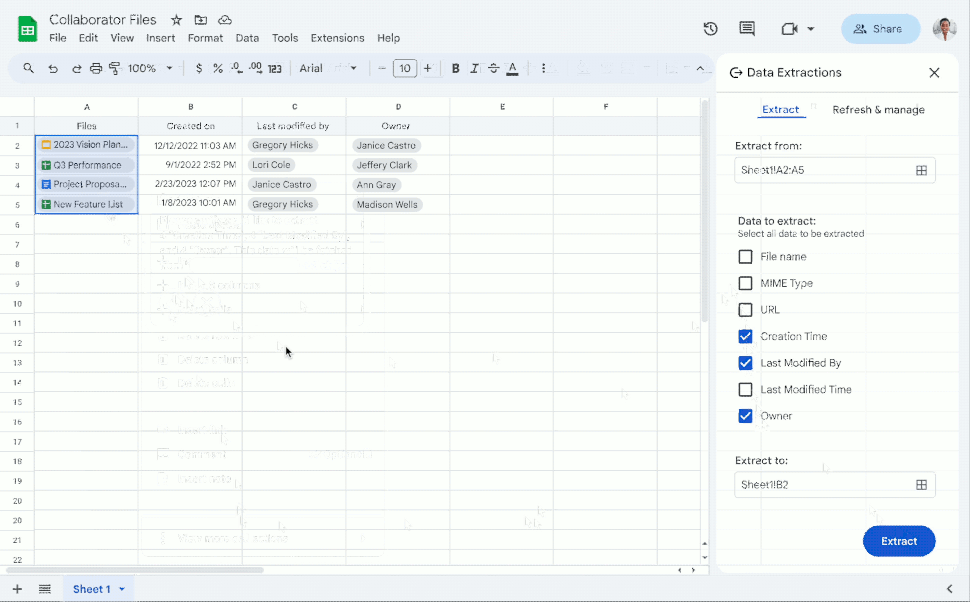
Going forward, the company says users will be able to quickly extract information from smart chips to give your work extra detail or analysis, pulling in information from people, file and event chips. It will also allow users you to pull out metadata associated with specific smart chips into its own cell, all whilst maintaining a connection with the chip it was extracted from.
(Image credit: Google Workspace)
The company gave the example of making it easier to keep track of a set of documents, as well as who owns them and details such as creation time or who last modified the file, which can now be done by extracting those fields from the relevant file chips.
"Smart chip data extraction allows you to track and organize data more easily, and also perform deeper analyses using data that is derived from smart chips," a Google Workspace update blog post announcing the change read.
"Useful actions include using file chips to understand when a document was last updated or using people chips to sort and filter employees based on job location to best delegate region specific tasks."
The feature is rolling out now for users on Rapid Release domains, with a wider release scheduled for June 14.
The ability to extract data already stored in chips will be available to all Google Workspace customers and users with personal Google Accounts, but some limits on extracting all available data will be placed on the latter, along with users with Google Workspace Essentials Starter, Business Starter, Frontline Starter, Frontline Standard, and Nonprofits accounts.
People living in Montana will soon need to download a VPN service to keep accessing TikTok.
Republican Governor Greg Gianforte signed for the proposed ban to become law on Wednesday May 17, with the block due to be officially enforced on January 1, 2024.
The move makes Montana the first US state to ban TikTok, raising concerns over their right to free speech - so we've looked at what's at stake for the future of the Chinese social media giant in the country and how using a TikTok VPN might help.
Montana TikTok ban
Gianforte described Montana's TikTok ban as, "our shared priority to protect Montanans from Chinese Communist Party surveillance," the BBC reported.
Perhaps the most downloaded app worldwide, TikTok has been facing growing scrutiny in the US and its allied nations recently. Politicians are especially worried about the app's link with Beijing, fearing that the Chinese Communist Party (CCP) could access US user data and spread nationalist propaganda.
Earlier this month, an ex-employee of TikTok's parent company ByteDance claimed the CCP had "supreme access" to all data as part of a larger wrongful layoff's lawsuit.
We will never trade our First Amendment rights for cheap political points
Keegan Medrano, ACLU of Montana
In December 2022, it was the news of ByteDance employees spying on some US journalists to raise the alarm. The video-sharing app was then banned on government devices among a long list of democracies, including the US, UK, New Zealand, Canada and some EU countries.
A total block is, however, what the US is striving for with the RESTRICT Act (now passing through the Congress) - exactly what Montana appears to have now finally achieved.
At the same time, experts argue that the US government has so far failed to bring concrete evidence of the alleged wrongdoings. Many commentators also warn of the potential consequences of making TikTok illegal in the US, arguing that the move will restrict Americans' digital rights.
"With this ban, Governor Gianforte and the Montana legislature have trampled on the free speech of hundreds of thousands of Montanans who use the app to express themselves, gather information, and run their small business in the name of anti-Chinese sentiment," said Keegan Medrano, policy director at the American Civil Liberties Union (ACLU) of Montana.
"We will never trade our First Amendment rights for cheap political points."
This law tramples on our free speech rights under the guise of national security and lays the groundwork for excessive government control over the internet.Elected officials do not have the right to selectively censor entire social media apps based on their country of origin.May 17, 2023
See more
The law will prohibit TikTok from operating inside the state borders, while also requiring app stores to prevent people in Montana from downloading the app. Non-compliance punishments could reach up to $10,000 of starting fine, in addition to another $10,000 for every day the violation continues.
"It would certainly be a costly gamble to keep download options available once the Bill comes into force and app stores would be well advised to comply," Olexandr Kyrychenko, Partner at London-based law firm IMD Corporate, told TechRadar.
All this might also create even worse security risks for TikTok users in Montana as 2024 starts won't be able to download any new updates and fix potential vulnerabilities.
VPN provider Private Internet Access (PIA) also believes that such a move would set a "worrisome precedent" over the future of digital freedom in the US. "Prohibiting the use of certain technologies or social media sites is a restrictive and likely ineffective way to protect US citizens’ data; who should have the right to choose whether or not they want to use these platforms."
According to the BBC, TikTok is expected to challenge the new law in court.
In an official statement, the tech firm wrote: "We want to reassure Montanans that they can continue using TikTok to express themselves, earn a living, and find community as we continue working to defend the rights of our users inside and outside of Montana."
In the meantime, we advise people in Montana to get a secure VPN service before the end of the year. This security software can, in fact, spoofs users' IP address location and make them appear if they're browsing from a completely different country within seconds.
Microsoft’s Bing chatbot is now available to use without signing into a Microsoft account, you’ll doubtless be pleased to hear.
This means that anyone can now jump on and start quizzing the ChatGPT-powered AI on whatever topic is on their mind, but there’s a caveat.
As some of you have noticed, we’ve started rolling out unauthenticated chat access on Bing. Seeing only 5 chat turns per session? Sign in to have longer conversations.May 17, 2023
See more
Windows Central spotted the tweet from Michael Schechter, VP of Search Growth and Distribution (Bing) at Microsoft, announcing that the Bing AI now offers unauthenticated chat access.
However, while you won’t have to sign in to use the AI, you’ll be limited to pretty short conversations – just five queries in a session. Those signed in get 20 queries per conversation.
In other Bing AI news, a further step forward for the chatbot is the addition of a share button and more export options, as well as an improved copy and paste experience, useful little touches (as Neowin flagged up).
We recently upgraded Bing Chat with export and share features. We’ve also improved the copy and paste experience. Below is an example of the tool tip which includes copy, download and share with download to PDF in action. Stay tuned for more export options. pic.twitter.com/vEgaDY4dqbMay 17, 2023
See more
Analysis: Bringing Bing to everyone faster
Remember when Bing AI was first launched? The chatbot got caught up in all sorts of controversial weirdness as a result of going off the rails in long chat sessions, leading Microsoft to impose strict limits on session length to tackle that particular problem.
That limit was five queries per session – exactly what unauthenticated users are getting now. In other words, it’s the bare minimum. (Well, clearly it’s the bare minimum – any lower than five would leave little or no opportunity to explore any topic further).
Still, the absolute minimum is very much better than nothing, so we’re glad to see Microsoft take this route. It makes for a convenient way for those who haven’t tried out the Bing AI yet to do so, and of course, that should mean extra traffic for Microsoft, too.
Doubtless Microsoft hopes that by giving folks a taster of Bing, it’ll impress them enough to sign in for the full lengthier chat experience.
Microsoft is working on yet another sizable update to Bing AI with this round going to mobile. The latest batch comes just weeks after a previous announcement of various desktop improvements and we have a lot to cover.
Starting off with the Bing app itself, users will be able to add a Bing Chat widget to their “iOS or Android home screen”. This gives you direct access to the AI with the option to either type in your query into the text window or select the microphone icon to ask the question verbally. You can start fresh with a new chat or continue with an old one as Microsoft is enabling the frequently requested “continuous conversations across platforms”. So now a conversation held with Bing on the desktop can continue on mobile devices and vice versa.
The last Bing app update sees the AI gaining new support for multiple countries and languages, which opens it up to more people around the world. Unfortunately, a list of all the newfound support was not included in the post (although we did ask). Microsoft also claims it “improved the quality for non-English chats.” However, the company didn’t provide any details on the level of improvement.
Expanding support
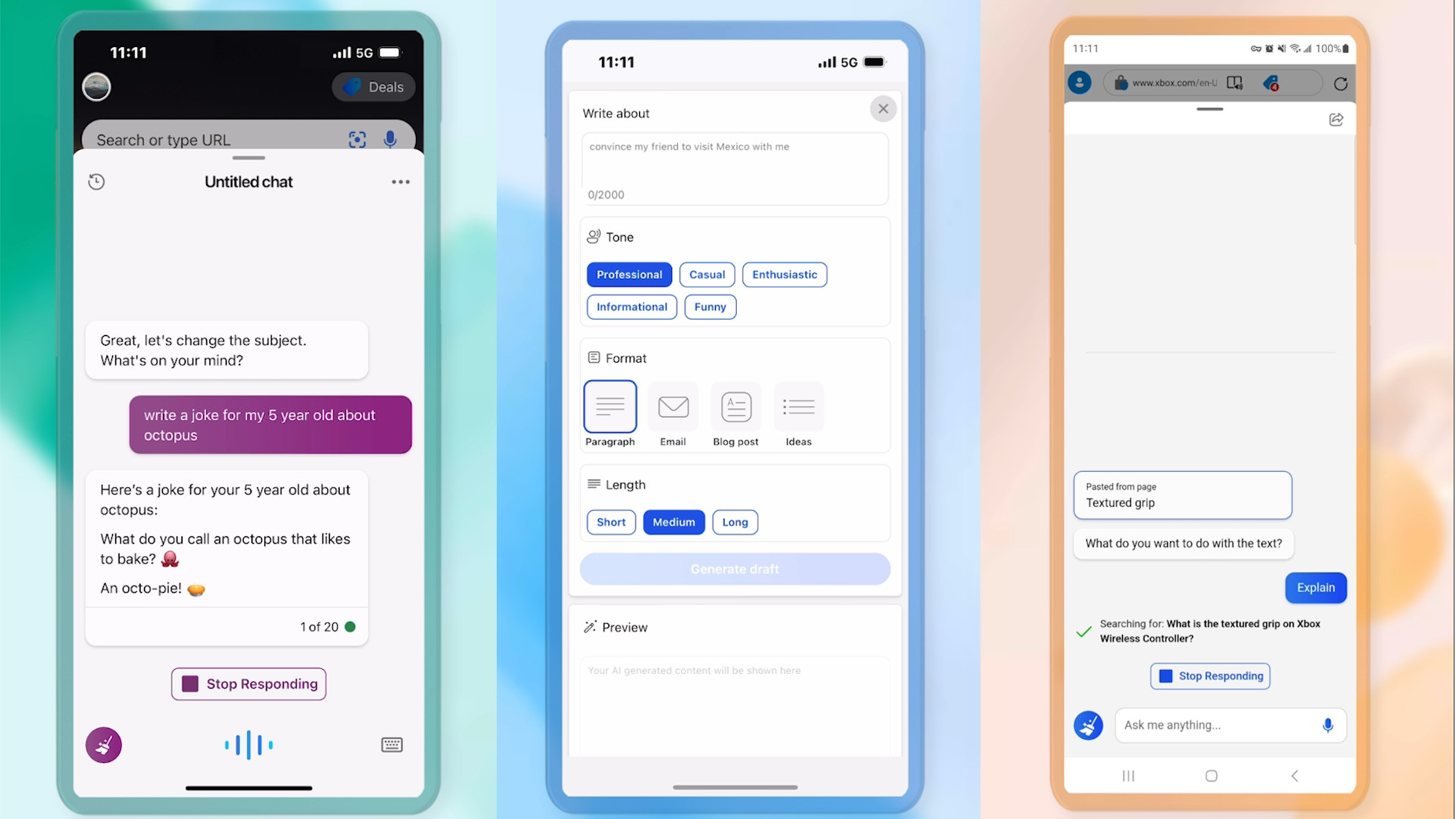
Moving on to the second app, SwiftKey will have a Compose feature to help you write texts “according to the parameters you suggest”. These parameters include the subject matter, tone, length, and format with the final one being useful for drafting emails. Of course, you can edit those drafts. Two new tones are being added to SwiftKey as well – Witty and Funny – bringing the total to six. So, if you want to have Bing create some eye-rolling dad jokes, you can (just be sure you use this power wisely). To top it all off, the AI-powered Translator on Android will be migrating over to iOS “within the next week” or so.
The Edge browser app is getting Contextual Chat allowing users to ask Bing a question based on the content they’re viewing. The example given is you can ask the AI what the best wine would be to pair with a recipe you're looking at or have it write up a summary of an article you're looking at. Learning will also be made a bit easier thanks to Selected Text Actions. Highlighting a piece of text will open a conversation with Bing where it will then explain that topic in detail complete with “cited sources”.
And last but not least, every single group chat in Skype will have access to the generative AI. All you have to do is tag it by entering “@Bing” into a discussion.
(Image credit: Windows)
Availability
The release dates of all these features are all over the place which is why it wasn’t mentioned earlier. The Skype update, SwiftKey Compose tool, and the Bing widget are releasing this week (week of May 14, 2023). Next week, we’ll see continuous conversations alongside the Translator tool. Everything else is unknown other than a vague “soon”.
We asked Microsoft if it could provide us with dates for the unmentioned features plus a list of the newly supported countries and languages. This story will be updated at a later time.
While we have you check out TechRadar’s list of the best AI tools for 2023 to see what the technology is capable of. It’s not just assistants or content generators.
Google and Microsoft have come a step closer to becoming amicable with the announcement that their respective calendar apps will become a whole lot more interoperable in a bid to keep users organized whichever service they decide to use.
A support page details how “users in both systems share their availability status so everyone can view each others' schedules.”
Furthermore, changes are being rolled out to how invitations are managed between the two rival companies.
Google Calendar and Microsoft Outlook interoperability
In its announcement, Google explains that “Calendar Interoperability is the critical component to help ensure events created in one calendar system are accurately propagated for guests using different calendar systems.”
Taking a move to recognize and support third-party services will inevitably work in favor of the company, with many individuals and businesses preferring to split their digital footprint between multiple companies, all of whom have their own merits and preferred use cases.
As part of the update, Outlook users who also have a Google Calendar with the same email address can receive Google Calendar invitations and RSVPs directly in Outlook without having to be in the Google ecosystem (which incidentally doesn’t have a dedicated desktop client). As standard, default reminders will also be created for Google Calendar invitations in Outlook.
On the flip side, non-Google Calendar recurring events are now hoped to be more “systematically and accurately” reflected in Google’s portal.
Unlike some changes, this is a Google-wide feature that applies to both business and individual customers, and is already available.
Having already announced other interoperability missions, like Meet and Zoom, it’s clear that Google is trying to broaden its appeal by more subtly integrating into third-party platforms, in turn giving customers a central ecosystem that they can work from with fewer limitations.
Microsoft has just fixed one of Windows 11’s neatest features - one that Chief Product Officer Panos Panay called a ‘game-changer’ when it was first introduced back in 2021.
The pre-loaded Clock application in Windows 11 has long included a feature that allows you to link up your Spotify account and set it to play specific productivity-focused playlists while you’re employing the nifty Focus Assist feature.
However, as previously noted by Neowin, the functionality had been broken for months (since at least February 2023, potentially longer), and despite Spotify trying to rectify the issue, it turned out to be an expired certificate on Microsoft’s end breaking the feature. Users attempting to link their Spotify account to Windows Clock would be met with a blank screen and an endless “Connecting to a service” message.
Thankfully, it looks like the problem is now resolved - in part, it seems, due to Neowin’s diligent reporting. When Spotify confirmed that the bug was Microsoft’s fault, Neowin reached out to the Windows creator to report the issue. Lo and behold, a few weeks later, the problem has been fixed; you can now hook up your Spotify account to the Clock app with no difficulties.
Microsoft, please love all your children equally
However, it looks like the problem is still lingering in Windows 10 - when I tried to connect my Clock app to Spotify on my personal desktop PC (after checking for system updates), I got the same empty white window.
Microsoft has been getting more and more aggressive in its efforts to push users to upgrade to Windows 11, but this feels like a spectacular low point. If the problem is something as simple as an expired certificate for Spotify’s API access, why not fix it for both Windows 10 and 11?
Look, I don’t hate Windows 11 (although Microsoft’s recent boo-boo over ads in the Weather app did make me chuckle). I use it on my work laptop and it’s fine - in fact, it’s steadily improving, gradually adding great features and gathering pace among users. It’s been on the rise for a while in terms of adoption - a quick look at the OS section of the Steam Hardware and Software Survey shows that Windows 11 is now eating into its predecessor’s share of the PC gaming space with impressive speed.
But as my colleague Darren recently said, Microsoft should be using the carrot, not the stick, to boost Windows 11 adoption. I love Windows 10 - why don’t you, Microsoft? It’s one of the best operating systems ever made, and I don’t want to feel forced to abandon it because you’re not willing to fix simple bugs that can be fixed in its successor.
It’s also frankly not a good look that it took more than three months - and a direct complaint from a tech news site - to fix such a simple problem. Come on, Microsoft. Oh, and you can stop with all the Bing AI nonsense. If I wanted an AI on my desktop, I’d just use ChatGPT.
The effective death of Windows 10 – in terms of feature updates being completely halted – may have been announced prematurely, as it seems Microsoft will still be tweaking and adding some capabilities to the OS, albeit only in a (very) minor capacity.
This is according to a Ghacks report that point outs a new Windows 10 build hitting the Release Preview channel, and guess what? There are some new features in that build (version 19045.3030).
This means that once tested in that preview channel, those features – which comprise of tweaks to the search box in the taskbar, and also minor changes to toast notifications – will be arriving for the full version of Windows 10 soon.
So, it seems while Microsoft will not be pushing out any major updates for Windows 10 – so there’ll be no 23H2 upgrade and no ‘Moment’ style feature drops for the OS – what might happen is that some minor features are going to pitch up from time to time in cumulative monthly updates.
Or at least it looks that way – let’s dig into this a bit more.
Analysis: Reading between the lines
It’s possible that this is one last hurrah, perhaps. A final feature tweak (or two, rather) that Microsoft has chucked in because it was the last piece of work those software engineers still beavering away on Windows 10 had finished off.
We simply don’t know for sure, and certainly, there’s no guarantee that small feature additions will be an ongoing thing. They may happen in some months, though, we shall just have to see.
If we look at what Microsoft announced at the end of April regarding the freeze on Windows 10 features (via the Windows Update Twitter account), the statement read: “Windows 10, version 22H2 will be the final version of Windows 10 released. It will receive monthly security update releases until October 14, 2025.”
To us, that very much implies that monthly security updates will be the only thing piped to Windows 10 from now until October 2025. However, it doesn’t expressly say there’ll be no features including minor tweaks – just that there won’t be a 23H2 version (or other big updates).
Looking at the new Release Preview build, it’s mostly a whole lot of bug squashing, with those two minor feature tweaks on top (though the search bar stuff is worth having).
So, the reality seems to be that it’ll mostly be security fixes going forward, but maybe with the occasional adjustment or slightly bigger change on the feature front – but nothing to get excited about.
Which in fairness makes the whole previous announcement easier to swallow. Our main complaint was Microsoft seemingly wanting to not even make minor tweaks to Windows 10, and it appears the firm will carry on some work on this front – maybe, anyway.
Time will tell, but for now, we think Windows 10 users can at least take some solace in this latest development. Even if the OS is definitely not going to see anything much done to it over the next couple of years of its remaining road before Microsoft pulls the rug for support.
It looks like complaining can work, as it appears that Microsoft has pulled a U-turn when it comes to cramming one of Windows 11’s most popular apps with ads.
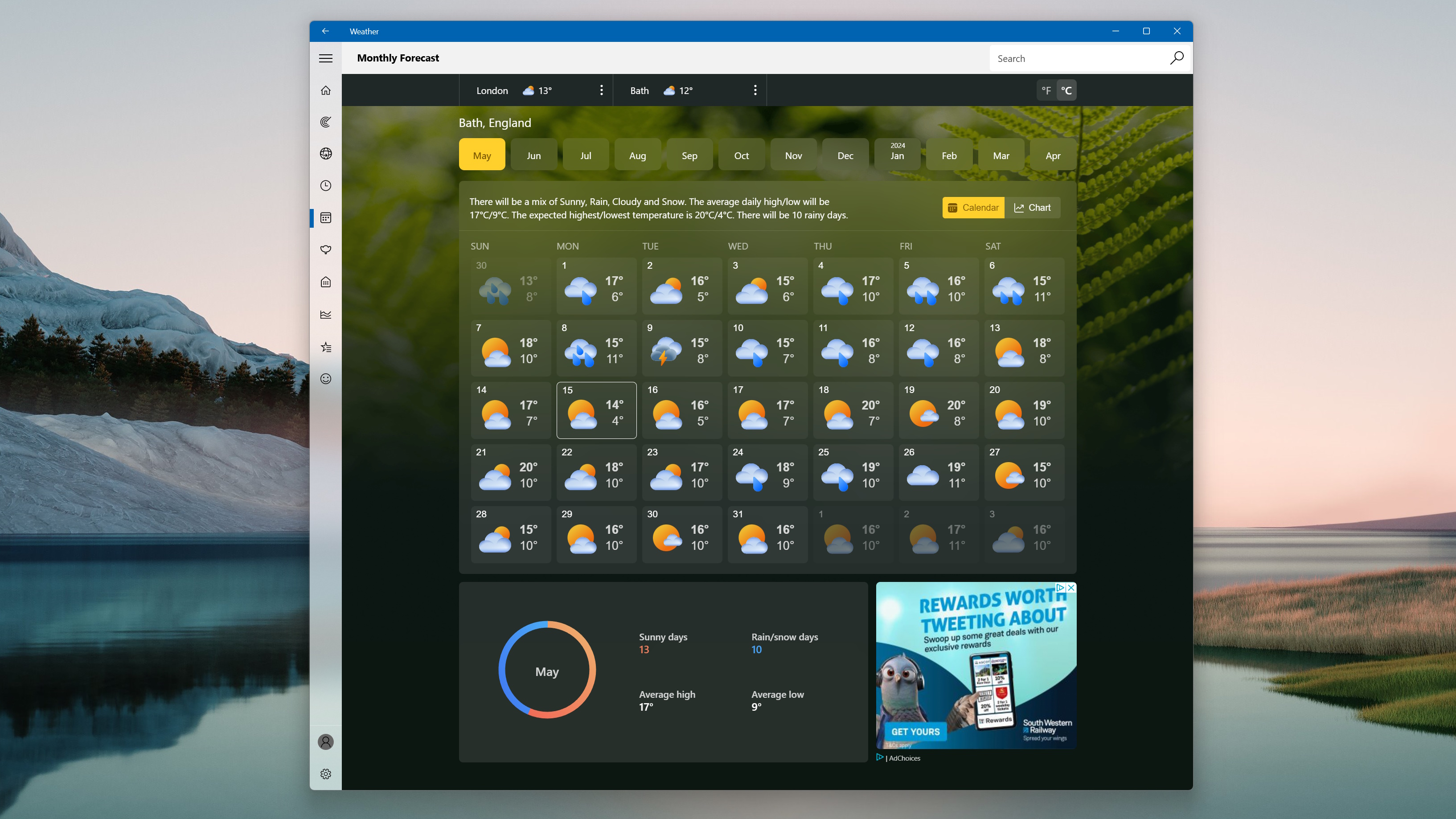
As Windows Latest reports, Microsoft had recently changed the Weather app in Windows 11 to be based on the MSN website’s weather service. While this ordinarily wouldn’t have been too controversial, as web-based apps can take up less storage space and run more quickly than traditional Windows apps, Microsoft still found a way of annoying users by adding ads into what was once an ad-free app.
This isn’t the first time Microsoft has riled up users by forcing ads into its products, but it looks like this time it went too far, with the backlash on social media and via Microsoft’s feedback site causing the company to quietly drop ads from the app – or at least in some of the app.
On the home screen, you’ll no longer see ads in the app. However, as Windows Latest noticed, and I’ve confirmed, if you click on another page in the app, such as ‘Forecasts’, there are still ads.
(Image credit: Microsoft)
Also, if you click ‘See full forecast’ from the Weather widget, you’ll end up on the MSN weather website, which also shows ads. Annoyingly, this also opens in Microsoft’s Edge web browser, and if you don’t have it set as default, you’ll also get a pop-up asking you to change that.
A welcome U-turn – but it’s not enough
All these adverts and nagging pop-ups can make Windows 11 feel like a chore to use, so I’m certainly glad that Microsoft seems to have taken to heart some of these criticisms.
A company listening to customer feedback and making relevant changes is always good and should be applauded. However, while I would love this to be a sign that Microsoft is re-evaluating its entire approach to ads in Windows 11, unfortunately, I don’t think that’s the case.
The fact that Microsoft quietly dropped ads from the first page of the Weather app without any acknowledgment makes me think Microsoft is not entirely fond of this move and could reintroduce ads just as quietly as it removed them.
Also, with ads only being removed from one screen in one app also leads me to think this is a move that’s not going to be replicated elsewhere – if at all. It all feels a bit like Microsoft has begrudgingly removed the bare minimum of ads.
So, despite this being a positive move, Microsoft has a lot more to do if it wants to properly address the concerns many people have about the liberties it's taking with Windows 11.
Tired of Microsoft telling you to upgrade to Windows 11? You may well be, as the software giant seems to have upped the pace with its badgering to move away from Windows 10 in recent times.
Windows Latest noticed that with eligible Windows 10 PCs – those that meet the system requirements for Windows 11 – another multi-screen nag is appearing for users that could see them losing the will to live by the time they get to the end of it.
This happens just before the desktop appears on bootup, and in fact, there are three full-screen pages of Microsoft attempting to persuade you to click and get your ‘free upgrade to Windows 11’ – or even four screens if you venture into the explanation of the benefits of the newer OS (by clicking on the ‘See what’s inside’ button).
As we’ve seen before, there’s the usual shenanigans around the interface, with the main two buttons presented to Windows 10 users – in the center of the screen – triggering either getting the upgrade there and then, or scheduling it for later (not declining it as you might expect).
If you want to skip the upgrade and stick with Windows 10, that option is tucked away at the bottom of the screen.
All that is on the first panel, and then on the next, you have to decline the upgrade a second time. Then, on the final screen, you still have to click to confirm you want to ‘Continue to Windows 10’ as Microsoft unleashes a parting shot highlight the benefits of Windows 11.
Analysis: Give it a rest already
Windows Latest tells us that more and more of its readers have been reporting that this multi-screen cajoling is being presented to them. Furthermore, we experienced exactly this nag at the weekend on our Surface Pro which is still running Windows 10.
That said, three-panel nags are nothing new. We’ve been seeing these for some time now, but we must admit, the regularity of how often they are appearing seems to have increased of late.
This latest three-pager does seem a bit more fleshed out than previous efforts, too, as far as we can recall – although it’s very much in a similar vein to what we’ve seen in the past.
Microsoft would appear to be on a big push of late to get folks to upgrade to Windows 11, as the flow of migration has been pretty sluggish to its latest operating system.
As well as the above measures, recently Microsoft also halted all feature updates for Windows 10, meaning there won’t be a 23H2 release – or even any minor tweaks feature-wise. All Windows 10 users will get are security updates from now on, until the end of support comes late in 2025.
That’s a veiled extra shove to help get folks to shift to Windows 11 in our books, underlined by the fact that Microsoft was quick to issue a reminder about this and that it ‘highly encourages’ folks to think about leaving Windows 10 behind now. Ironically, though, the regularity with which Microsoft is beating the upgrade drum for Windows 11 is causing discouragement, if anything, at least to us. And we’re sure that we are not alone in feeling that sentiment.
Windows 10 users who haven’t upgraded to the latest version of the operating system (22H2) will soon have to do so.
That’s because Microsoft is ending support for Windows 10 21H2 on June 13, and has issued a reminder to that effect (as Neowin reports).
In other words, the June 2023 security update will be the final one for those on 21H2. After that, there’ll be no more updates at all, feature-wise, or security fixes.
If you want further updates, you’ll need to be running Windows 10 22H2. Microsoft notes: “As always, we recommend that you update your devices to the latest version of Windows 10, or upgrade eligible devices to Windows 11.”
Analysis: Final call for Windows 10 upgrades
Naturally, Microsoft couldn’t let go of an opportunity to get a quick plug in for upgrading to Windows 11. Of course, if your PC doesn’t meet the system requirements for Windows 11, then you can’t switch over to the latest OS. Furthermore, you might not want to anyway, due to some of the decisions Microsoft has made, particularly on the interface front with Windows 11.
At any rate, this forced upgrade for Windows 10 users will be the last one. There won’t be a newer version than 22H2 to upgrade to, as Microsoft recently announced that this is the last feature update for the older operating system. There’ll be no 23H2 or anything else – only monthly security updates from now on, which will continue to be provided for Windows 10 until the OS itself goes out of support (which will be in October 2025, so still a relatively long way off).
All of which is very much angling to get folks to upgrade to Windows 11, with adoption not being everything Microsoft would’ve hoped for at this stage. Certainly not compared to how things went with Windows 10, which had racked up far more users than Windows 11 at the same point in its lifespan.
Google continues to “experiment” with its advertising efforts as it looks like YouTube may begin looking for ad-blockers.
Reddit user Sazk100 posted a screenshot of a new popup on the YouTube subreddit telling them ad-blockers are no longer allowed on the website. As a result they were unable to watch videos. After getting the notification, YouTube gave Sazk100 two options: one) disable the ad-blocker or two) purchase a subscription to YouTube Premium. This does appear to be a real notice and not some prank. The moderator team on the subreddit claims a YouTube employee reached out to them confirming its legitimacy. Other outlets have had a YouTube spokesperson tell them the company is running a small global experiment urging users with ad blockers to allow ads or try YouTube Premium.
It’s unknown just how far reaching this experiment is nor do we know if YouTube will officially implement these plans. We asked the company these questions only to be given the same comment by a representative – that it's all an "experiment".
It is important to point out Google has been conducting multiple advertising tests such as the recent flood of integrated ads into Gmail accounts. As you can probably imagine, people aren’t too happy with any of them.
War against ad-blockers
For the past several years, Google has been at war with ad-blocking software. Back in early 2016, the company actually banned ad-blockers from its Play Store only to revert its decision not long after. But that hasn’t stopped Google from trying other methods to ensure you get your daily dose of commercials. Last year, Android VPN apps that didn’t use the VPNService API (Application Programming Interface) were banned from the Play Store because they were claimed to interfere with advertising. And YouTube Vanced, which offered a totally ad-free experience of the video platform, was unceremoniously taken down.
Don’t think that browser extensions are safe either. Google has been working on the third version of its Manifest API which may prevent privacy tools like uBlock Origin from working as it would remove “key read and modify data permissions”.
Intrusive
None of this would be so bad if YouTube ads weren’t intrusive. Unfortunately, they are. Screenshots from Twitter and Reddit posts have shown people getting as much as 10 unskippable advertisements back-to-back on certain videos. These unskippable advertisements cropped up in late 2022, and like today, a YouTube spokesperson back then said the unskippable advertisements were a part of an experiment. So it is possible Google is telling the truth and has no real intention of implementing anything.
But if it is implemented, you have to wonder if this whole thing is going to turn into a weird cat-and-mouse game where developers find a way to circumvent YouTube’s ad-blocker detector only for the platform to make stricter tech ad infinitum. Let's hope this doesn't happen.
Intrusive advertising online has gotten so bad you even have the FBI recommending people get an ad-blocker. To find out which one is the best, check out TechRadar’s list of the best ad-blockers for 2023.
Windows 11 users are experiencing a bunch of issues – many of them ongoing – following the latest update for the OS, according to reports on Reddit.
A new and rather worrying-sounding problem that some folks have experienced was highlighted in the thread on Reddit discussing the latest cumulative update for Windows 11 that arrived earlier this week (KB5026372 for Windows 11 22H2).
A Redditor tells us: “This update broke the widget panel again and now it crashes something else; I think I’ll uninstall this update.”
In fact, it can crash Windows 11 completely, as someone else affected by the problem (again on Reddit) points out: “Opening widgets has become a game of Russian Roulette. Sometimes it works and sometimes it crashes the OS.”
Another user chips in with the former thread, noting they have the exact same gremlin in the works. Nasty indeed, although that said, we’ve seen a potential cure being mentioned (we’ll bring that up when we discuss this in a bit more depth below).
Elsewhere on the lengthy Reddit thread for KB5026372, we see complaints that the problem of SSDs running much more slowly than they should hasn’t been resolved (an issue kicking about since March).
There are also reports of VPNs being problematic with the update – again, a continuing glitch with Windows 11 – with speeds dropping when using L2TP/IPsec protocols, and connection issues being reported, too.
A further problem has been complained about by a number of people who use an Xbox controller and Xbox wireless adaptor with their Windows 11 PC. They’re finding that a crash happens when they turn off the controller. (But otherwise, everything works fine).
Seriously annoying TPM detection issues also remain, with several users complaining about this happening (it seemingly affects various AMD Ryzen processors).
Analysis: Flak fired at Microsoft
A lot of these reported problems are issues that have been spotted before, and are hanging around – with Windows 11 users who are affected starting to get seriously irritated that Microsoft hasn’t yet deployed a fix for these.
We can imagine if you are experiencing your SSD running much more sluggishly than it should (including booting), that’s going to get pretty old, pretty quickly. And this bug has been around since March.
As one Redditor observes: “Come on Microsoft... Security bugs and slowness should be a priority over ads about Edge in the search bar!!!“
They’ve hit the nail on the head there, in our opinion.
As for the new issue with widgets, we don’t know how widespread that is. There are just a few scattered reports right now, so we’re assuming it’s only affecting a small number of people. However, with it crashing Windows 11 sometimes, it’s a pretty unpleasant bug to be hit by, no doubt.
The good news with the widget panel flaw is that as we mentioned above, there’s an apparent cure. And that’s to uninstall the cumulative update, and then reinstall it, which according to one report resolves the problem. Obviously, take this advice with a good deal of salt – it may or may not work for you, but could be worth a shot.